97 templates
Billing & finance
Starter templates for billing & finance, as they appear in the composer. Subject lines show their variables in brackets.
As recipients see them
How these emails look
Rendered by SecureThread’s own email renderer with each template’s example details. Your logo, company details and the facts you fill in replace them when you send.
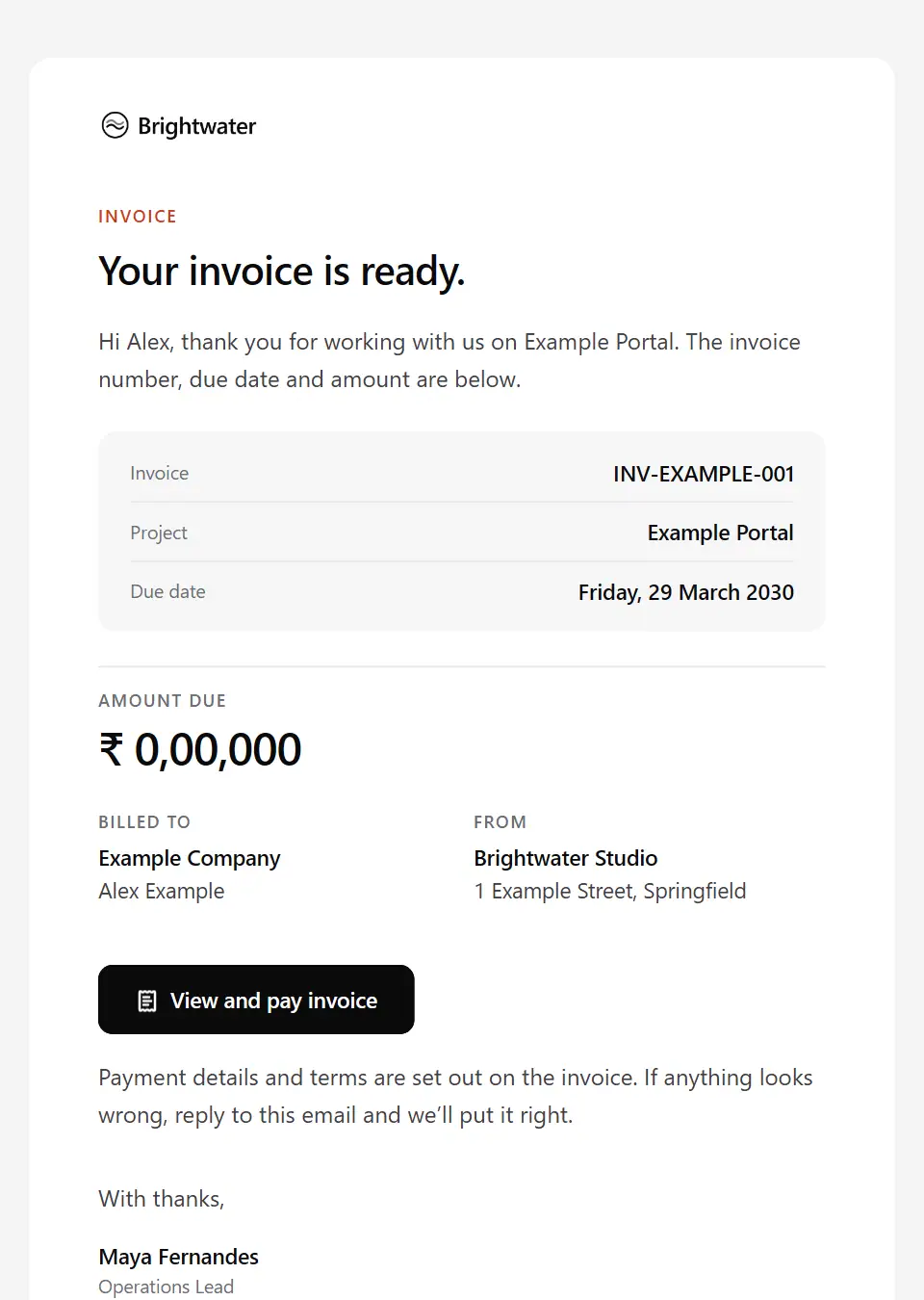
Invoice issued
Sends a new invoice with the amount and due date; terms stay on the invoice itself.
Subject: Invoice [invoice number] from [company name]
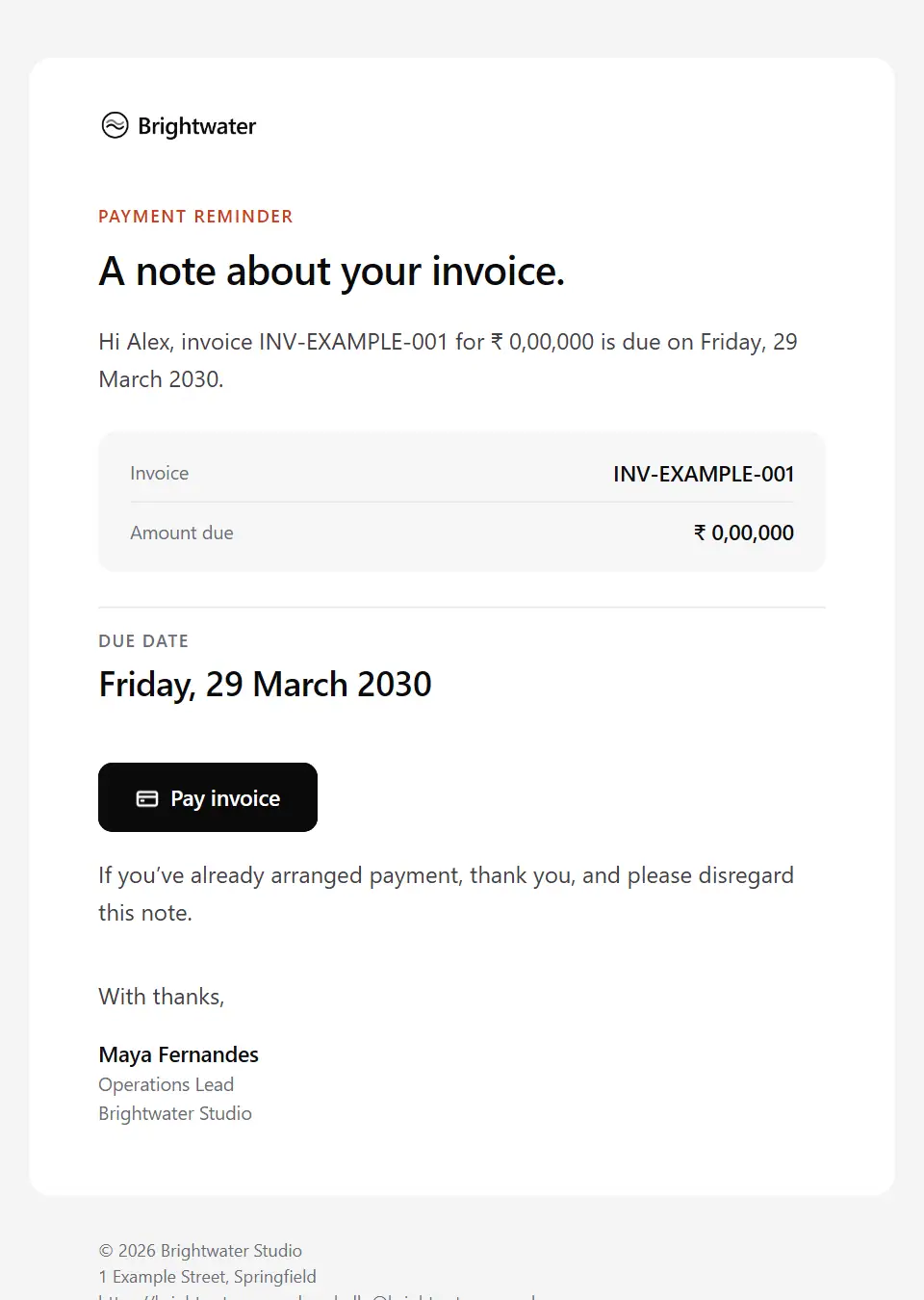
Payment reminder
A courteous reminder before an invoice falls due.
Subject: Reminder: invoice [invoice number] is due on [due date]
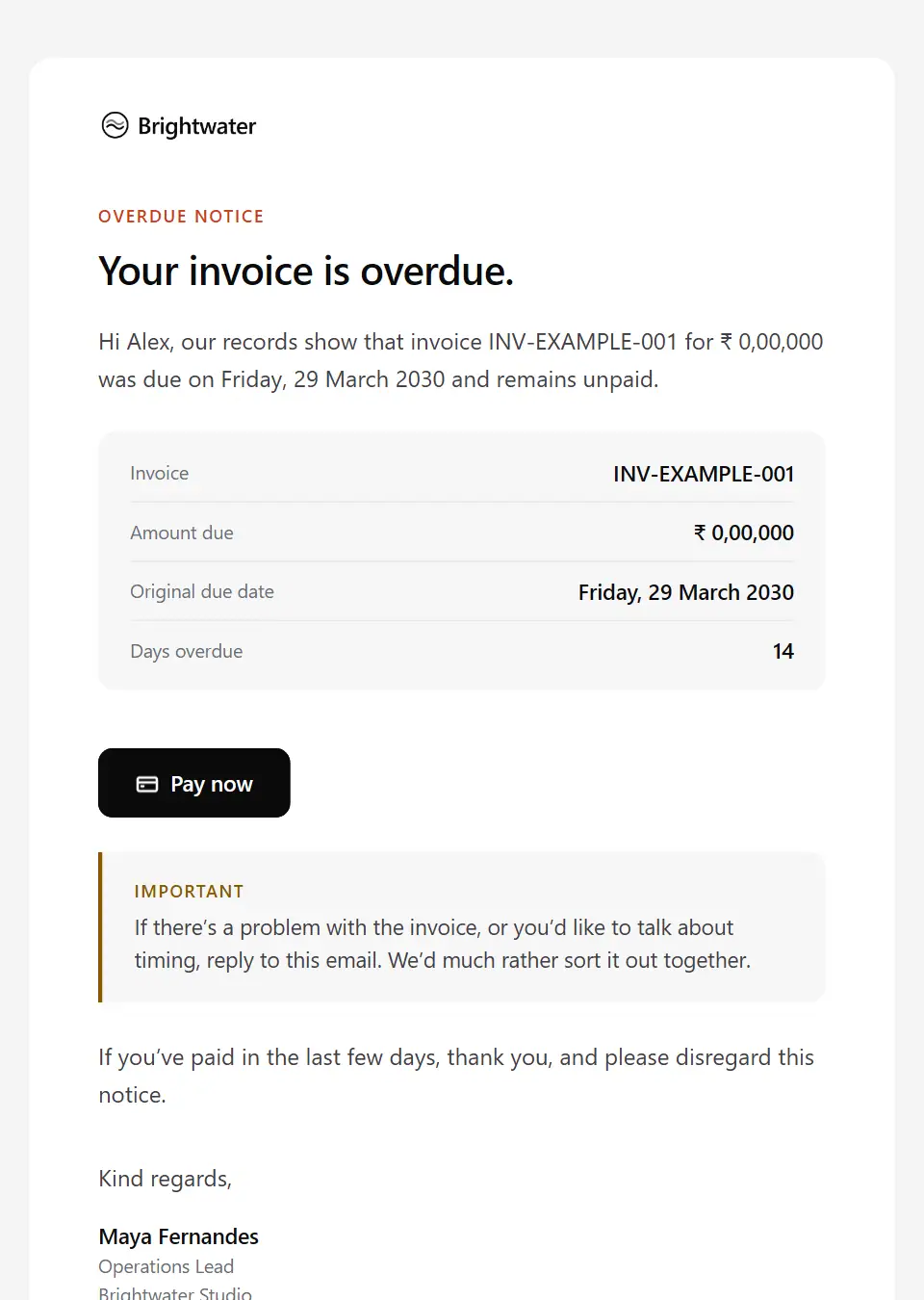
Overdue payment notice
A clear, polite notice that an invoice is past due, with an open door to talk.
Subject: Invoice [invoice number] is now overdue
Estimate sent
Sends an estimate with what it covers and the estimated total; assumptions and terms stay in the document.
Subject: Your estimate for [project name]
Purchase order request
Asks a client to raise a purchase order for agreed work, with the details their procurement team needs.
Subject: Purchase order needed for [project name]
Payment received
A receipt for a client’s payment against an invoice: amount, date, method and payment reference.
Subject: Payment received for invoice [invoice number]
Subscription renewal notice
Gives notice before a subscription renews automatically: plan, date, amount and how to make a change.
Subject: Your [product name] plan renews on [renewal date]
Refund processed
Confirms a refund with the amount, where it was sent and when it should reach the customer’s account.
Subject: We’ve refunded [amount]
Billing details update request
Asks a billing contact to confirm the details we hold, by reply or in the official portal. Never asks for bank or card details.
Subject: Updating our billing records for [client company]
Vendor payment confirmation
Tells a supplier their invoice has been paid, with the amount, date and our payment reference.
Subject: We’ve paid invoice [invoice number]
Expense claim approved
Tells a team member their expense claim is approved, how much will be paid and when to expect it.
Subject: Your expense claim [reference number] is approved
Tax details request
Asks a client’s billing contact to confirm the tax details their invoices need, by reply or in the official portal. Never asks for bank or card details.
Subject: Tax details for [client company]’s invoices
Payment schedule confirmation
Confirms in writing a client’s agreed plan to pay an invoice in stages: each amount, each date and the total.
Subject: Payment schedule for invoice [invoice number]
Payment failed
Tells a billing contact calmly that a payment didn’t go through, and points to the official billing account and a named contact. Asks for no card details.
Subject: Your payment for invoice [invoice number] didn’t go through
Credit note issued
Sends a client a credit note against an invoice: why it was issued, the amount and how the credit will be used.
Subject: Credit note [credit note number] for invoice [invoice number]
Late payment fee notice
Tells a client that a late payment fee now applies to an overdue invoice, citing the terms that set it, with the new balance, a named contact and an open door to talk. Review with HR/legal before sending; send individually.
Subject: Late payment fee on invoice [invoice number]
Statement of account
Sends a client their statement for a period: opening balance, invoices, payments, credits and the balance due.
Subject: Statement of account for [billing period]
Final invoice
Sends the last invoice of a project, showing how it relates to the project total, with the amount and due date.
Subject: Final invoice for [project name]
Corrected invoice issued
Replaces an invoice that had an error: which invoice it replaces, what changed, the amount and due date now, and what happens to any payment already made against the original.
Subject: Invoice [invoice number] has been corrected
Purchase order received for invoicing
Confirms to a client that their purchase order for agreed work has arrived: its number, value and expiry, how invoices will quote it, and any difference from the quote that needs resolving.
Subject: We’ve received purchase order [po number]
Account statement ready to view
Tells a banking, payments or investment customer that a statement, annual summary or valuation is ready in the secure portal, keeping balances and transactions out of the email, and how to query anything unrecognised.
Subject: Your [statement type] for [billing period] is ready to view
Patient billing statement available
Tells a patient a new billing statement is ready in the patient portal, with only the amount due and the due date; services and line items stay in the portal. Send individually.
Subject: Your patient statement from [company name]
Patient insurance details request
Asks a patient to add or correct their insurance or payer details in the patient portal by a date, says why, and offers a self-pay option. Never asks for the details by email.
Subject: Please update your insurance details
Legal billing statement
Sends a client the bill for one matter and period: professional fees, disbursements, money applied from funds held on account, the balance and due date, the itemised bill and how to query it.
Subject: Your bill for matter [matter reference], [billing period]
Landlord rental statement
Sends a landlord their rental statement for a period: rent collected, fees and costs deducted, any arrears, the amount paid out and when.
Subject: Your rental statement for [billing period]
Account holder change confirmation
Confirms that responsibility for a telecom or utility account has moved to a new holder: from when, the reading or date that splits the bills, the new account reference and each person’s next steps. Send to each separately.
Subject: Change of account holder from [changeover date]
Utility or telecom final bill
Sends the final telecom or utility bill when an account closes: the closing reading or end date it uses, the amount due or credit owed, how a credit is refunded and any equipment balance still open.
Subject: Your final bill for account [account reference]
Meter reading request
Asks a utility customer for a meter reading by a date: which meter, how to read and send it, that the bill will be estimated without one, and help for anyone who can’t reach their meter.
Subject: Your [supply type] reading is due by [reading due date]
Account on credit hold
Tells a trade customer their account is on credit hold over an overdue balance: what is paused and from when, the invoices involved, how to lift the hold and who to speak to. No threats.
Subject: Your account is on hold from [hold date]
Collections escalation to a senior contact
A personal note to a senior person at a client when overdue invoices stay unpaid after reminders to the billing contact, asking them to name someone who can resolve it. Send individually.
Subject: Overdue invoices at [client company]: can you help?
Direct debit advance collection notice
Gives a payer notice of the amount and date of the next direct debit collection, what it covers and the date to query it by.
Subject: We’ll collect [collection amount] on [collection date]
Direct debit mandate confirmation
Confirms a newly set up direct debit: the reference, the account, the first collection, how often payments are taken, the notice given before each and where the scheme terms are.
Subject: Your direct debit is set up: reference [mandate reference]
Overdue invoice final notice
The last reminder for an unpaid invoice before the next step the agreement allows, with the earlier reminders, the final date and an open offer to talk.
Subject: Final notice: invoice [invoice number] is overdue
Overdue invoice second notice
The second reminder for an invoice still unpaid after the first overdue notice, asking for a payment date or the reason it is held up.
Subject: Second notice: invoice [invoice number] is overdue
Missed payment plan instalment
Tells a client calmly that an instalment under their agreed payment plan hasn’t arrived, with the remaining schedule, what the plan says happens next and an offer to revisit it.
Subject: Your payment plan instalment of [instalment amount] is overdue
Payment plan proposal
Proposes a payment plan to a client with an overdue balance: the balance covered, each instalment and its date, the conditions by reference to the agreement, and the date to accept by.
Subject: A proposed payment plan for [account reference]
Unidentified payment query
Asks a client which invoices a payment is meant to settle when it can’t be matched or differs from the invoices open, giving the amount, date and bank reference received.
Subject: Help us match your payment of [payment amount]
Loan repayment reminder
Reminds a borrower that a loan or mortgage instalment is coming up: the amount, the date, how it will be collected and who to talk to early if paying is difficult.
Subject: Your loan repayment is due on [due date]
Missed loan repayment notice
Tells a borrower a loan repayment was missed: the amount now overdue, what the agreement says happens next, how to pay through known channels and where to find support.
Subject: We haven’t received your loan repayment
Public service fee due notice
Tells a resident or business that a public fee is due: what it covers, the amount, the date and payment reference, the ways to pay, how to check the email is genuine and where to get help.
Subject: [fee description] due on [due date]
Patient balance final notice
A formal final reminder for an unpaid patient balance, with the amount, the date to act by, the clinic’s own next step and the financial help available, sent to one patient at a time with no threats.
Subject: Final reminder: your balance with [company name]
Patient payment reminder
A courteous first reminder that a patient balance is due, with the amount, the date, how to pay in the portal and who to talk to about the payment options the clinic offers, sent to one patient at a time.
Subject: A reminder about your balance with [company name]
Insurance premium payment reminder
Reminds a policyholder that a premium or instalment is coming up: the amount, the date, how it is paid and which policy it is for.
Subject: Your insurance premium is due on [due date]
Missed insurance premium notice
Tells a policyholder a premium could not be collected: the amount outstanding, the date to pay by and what the policy terms say happens to cover if it stays unpaid.
Subject: We couldn’t collect your premium for [policy number]
Legal retainer replenishment request
Asks a client to top up the money held on account for their matter when it falls below the level their engagement letter sets: the balance, the amount, the date and how to check payment details safely.
Subject: Topping up funds on account for matter [matter reference]
Overdue rent notice
Tells a tenant that rent for a period is overdue, with the amount, a date to pay by and an offer to talk about a plan, without threats or penalties.
Subject: Your rent for [rent period] is overdue
Rent due reminder
A friendly reminder before rent falls due: the period, amount, due date and payment reference, pointing to payment details the tenant already holds rather than giving new ones.
Subject: Rent for [rent period] is due on [due date]
Rent payment received
Receipts a tenant’s rent payment for a period, with the amount, date and reference, the balance on their account and the next due date.
Subject: Rent received for [rent period]
Service disconnection notice
Formal notice that a telecom or utility service may be disconnected or restricted over an unpaid balance, to send individually after review with legal and compliance.
Subject: Disconnection notice: account [account reference]
Trip balance due reminder
Reminds a lead traveller that a trip’s balance falls due before departure: the amount, the date, the link to pay and what the booking conditions say if it isn’t paid.
Subject: Your trip balance is due on [deadline date]
Billing dispute acknowledgement
Confirms that a client has disputed an invoice or charge: the reference, the amount in question, what happens to reminders on it, what remains payable, who is reviewing it and when the outcome is due.
Subject: We’re reviewing your query on invoice [invoice number]
Billing dispute outcome
Gives the outcome of a billing dispute whichever way it went: the decision and reasons from variables, any credit note or adjusted invoice, what is now payable by when, and who to contact about it.
Subject: The outcome of your query on invoice [invoice number]
Credit balance on account
Tells a client their account holds a credit from an overpayment or credit note, asks how they would like to use it and says what happens if they do not reply. Never asks for bank details.
Subject: A credit of [credit amount] on your account
Merchant chargeback notice
Tells a merchant that a cardholder has disputed a payment: the amount in question, the reason given, the date to submit evidence and where to respond in the dashboard.
Subject: A cardholder has disputed payment [payment reference]
Post-stay charge notice
Tells a guest about charges added after check-out, such as unbilled extras or damage: each item and amount, the terms it falls under, how it is paid and how to query it.
Subject: Charges added after your stay: [booking reference]
Deposit return and deductions
Proposes how a tenancy deposit is returned after check-out: the findings, any deductions, the amount to return, and how to agree or dispute it through the protection scheme.
Subject: Your deposit for [property short address]: proposed return
Telecom and utility bill query response
Answers a customer’s query about a telecom or utility bill: which bill, what was checked, the outcome, any corrected amount or credit, and the formal route if they still disagree.
Subject: Your query about your [billing period] bill
Travel refund status update
Updates a traveller on a refund still in progress after a cancellation: the total due, what has been repaid so far, what is still waiting on airlines or other suppliers, and when they’ll next hear.
Subject: Your refund for [booking reference]: where it stands
Corporate card receipts reminder
Reminds a cardholder which company card transactions still need receipts, coding or a business purpose before the statement closes, and what the card policy says happens if they stay unreconciled.
Subject: Card receipts needed by [deadline date]
Expense claim not approved
Tells a team member which items on their expense claim can’t be reimbursed, the reason and the policy behind it, what is still approved, and how to ask for the decision to be looked at again.
Subject: About your expense claim [reference number]
Expense claim paid
Confirms that an approved expense claim has been paid: the amount, the date, how it was paid (for example with salary) and any difference from the amount claimed, with no bank details.
Subject: Your expense claim [reference number] has been paid
Expense claim returned for more details
Sends an expense claim back to a team member with the receipts or details it needs, such as a cost centre or business purpose, and the date to resubmit by so it can be approved.
Subject: Your expense claim [reference number] needs a few details
Expense claim submitted
Confirms that a team member’s expense claim has arrived, with its reference, total, who approves it next and roughly how long approval takes.
Subject: Your expense claim [reference number] is with [approver name]
Annual budget submission request
Opens the budgeting round: asks budget holders to submit next year’s budget for their cost centre by a date, with the template, finance’s planning assumptions, the review dates and who to ask.
Subject: [fiscal year] budget: submissions due [deadline date]
Budget approval request
Asks a budget holder or leadership to approve new or additional budget backed by a business case: what it is for, the amount, cost centre and period, alternatives considered and the date a decision is needed.
Subject: For approval: [budget item], [amount]
Budget request decision
Gives a requester the decision on a budget or spend request, taken from variables: the decision, the approved amount, any conditions, the reason and the next steps.
Subject: Decision on your budget request: [budget item]
Budget variance query
Asks a budget holder to explain the difference between actual spend and budget for a period, line by line, by a date, so their commentary can go into the management accounts.
Subject: [cost centre]: variance against budget, [reporting period]
Discretionary spending freeze notice
Tells budget holders and staff that discretionary spending is paused: what it covers, what is exempt, how to ask for an exception and when it will be reviewed, all supplied by finance or leadership.
Subject: Discretionary spending is paused from [effective date]
Revised legal costs estimate
Tells a client that the costs estimate for their matter has changed: the previous and revised figures, costs so far, the lawyer’s reasons and the date to confirm they want work to continue.
Subject: A revised costs estimate for matter [matter reference]
Corporate travel approval request
Asks a traveller’s approver to approve or decline a business trip before it is booked: itinerary, total cost, cost centre, whether it meets the travel policy and why not, and when the held fares expire.
Subject: Approval needed: [traveller name] to [destination]
Account reconciliation request
Lists the differences between your records and a client’s or supplier’s as at a date, item by item, and asks them to confirm each one or send the documents that explain it.
Subject: Reconciling our accounts as at [reconciliation date]
Monthly management accounts
Circulates the monthly management accounts to leadership or the board: the headline figures and commentary finance supplies, a link to the pack and the date for questions before the review meeting.
Subject: Management accounts for [reporting period]
Month-end close timetable
Gives colleagues the month-end cut-off dates for supplier invoices, expense claims, accruals and journals, the reporting date, and what happens to anything that arrives late.
Subject: [close period] close: the dates you need
Year-end close timetable
Sets out the year-end timetable for colleagues: stock counts, asset and accrual confirmations, system freeze dates and the audit fieldwork window, with a named finance contact for questions.
Subject: Year-end [fiscal year]: the close timetable
Audit PBC list request
From an audit firm to a client’s finance team: the prepared-by-client list for the audit, the priority items, the first and final due dates, the secure upload route and when fieldwork starts.
Subject: Your PBC list for the [fiscal year] audit
Payment card expiring
Reminds a subscriber or account holder that the card on file expires before the next charge and asks them to update it by signing in at the address they already know. No link, and never asks for card details.
Subject: Your card for [product name] expires in [card expiry month]
Subscription payment failed
Tells a subscriber an automatic charge didn’t go through, when it will be retried and the date their access is affected if it keeps failing, and asks them to update the payment method by signing in as usual.
Subject: We couldn’t take your [product name] payment
Subscription payment receipt
A receipt for an automatic subscription charge: the plan, the period it covers, the amount and tax, the payment method as a masked label, the receipt number and the next charge date.
Subject: Your [product name] receipt for [billing period]
Resold licence renewal quantities
Asks a managed IT client to confirm how many third-party licences you resell to them should renew, with current usage, the renewal quote and what happens if there is no answer by the date.
Subject: [licence name] renewal: please confirm quantities
Legacy plan retirement notice
Tells customers on a plan that is being discontinued when it ends, the plan they’ll move to by default and its price, and how to choose another before a date.
Subject: Your [legacy plan name] plan is being retired
Plan upgrade confirmation
Confirms a move to a larger plan: the previous and new plan, what is now included, when it takes effect, the prorated charge and the new renewal price.
Subject: Your upgrade to [new plan name] is confirmed
Seat limit approaching
Tells a workspace administrator that nearly every paid seat is in use, what happens when the last one is taken and how to add seats or free up unused ones.
Subject: [workspace name] has used [seats used] of [seats total] seats
Subscription activated
Confirms that a paid subscription has started: the plan, seats, billing cycle, first invoice and next renewal date, and where to manage it.
Subject: Your [plan name] plan is now active
Usage quota reached
Tells a customer or workspace administrator that a plan allowance has run out: what is now limited or charged, when it resets and how to raise the limit or add more.
Subject: You’ve reached your [quota name] limit
Usage quota warning
Warns a customer or workspace administrator that most of a plan allowance, such as API requests, storage or mobile data, is used before it resets, and what happens beyond it under their plan.
Subject: You’ve used [usage percent] of your [quota name]
Tariff or plan change confirmation
Confirms a move to a new telecom plan or energy or water tariff: the previous and new plan, the start date, the new charges, any new minimum term and exit fees, and the cooling-off period.
Subject: Your move to [new plan name] is confirmed
Telecom or energy contract ending notice
Tells a telecom or energy customer their minimum term or fixed tariff is ending: the end date, today’s price, the price afterwards if they do nothing, the options open to them and how to choose.
Subject: Your [plan name] contract ends on [contract end date]
Tax residency and withholding documents request
Asks a supplier or payee for the tax residency and withholding documents needed before they are paid, uploaded through the secure portal by a date, with why they are needed and what happens if they are missing.
Subject: Tax documents needed before we pay [recipient company]
Withholding tax certificate issued
Tells a supplier or contractor that the certificate or annual statement of payments and tax withheld for a period is ready in the supplier portal, with the totals and the date to report a mismatch by.
Subject: Your tax certificate for [certificate period] is ready
Withholding tax certificate request
Asks a client for the certificates for tax they withheld from your payments in a period, listing each payment and deduction, so the tax withheld can be claimed as a credit.
Subject: Tax deduction certificates for [certificate period]
Remittance advice
Tells a supplier what a payment covers when it settles several invoices: the payment reference and date, each invoice paid, credit notes applied and any deductions explained.
Subject: Remittance advice: payment [reference number]
Supplier bank details change verification
Replies to a supplier’s request to change their bank details: nothing changes on the strength of an email, how the change will be verified through a contact already on file, and what happens to payments meanwhile.
Subject: About your request to change [recipient company]’s bank details
Credit note request to a supplier
Asks a supplier to issue a credit note for a known reason, such as returned goods, a duplicate invoice or a price difference, with the evidence and what is held back until it arrives.
Subject: Credit note needed for invoice [invoice number]
Supplier invoice approval request
Asks a colleague to confirm a supplier invoice is genuine and approve it for payment: supplier, amount, purchase order, coding, the date to approve by and what to do if they didn’t order it.
Subject: Please approve: [supplier name] invoice [invoice number]
Supplier invoice returned unprocessed
Tells a supplier their invoice can’t be processed as sent, lists what must change, such as a missing purchase order number or the wrong billing entity, and asks for a corrected invoice.
Subject: Invoice [invoice number] can’t be processed yet
Supplier payment status update
Answers a supplier asking when they’ll be paid: where each invoice stands (received, approved, scheduled or on hold), the next payment date and what is holding up any invoice.
Subject: Payment status: [recipient company] invoices
Supplier statement request
Asks a supplier for a statement of their open invoices, payments and credits for a period, so accounts payable can match it to the ledger before the books close.
Subject: Please send us your statement for [billing period]
Send your first approved email today
Connect a mailbox, pick a template and send with the checks and approvals your organization needs. No new email address, no new habits.