42 templates
Admissions & students
Starter templates for admissions & students, as they appear in the composer. Subject lines show their variables in brackets.
As recipients see them
How these emails look
Rendered by SecureThread’s own email renderer with each template’s example details. Your logo, company details and the facts you fill in replace them when you send.
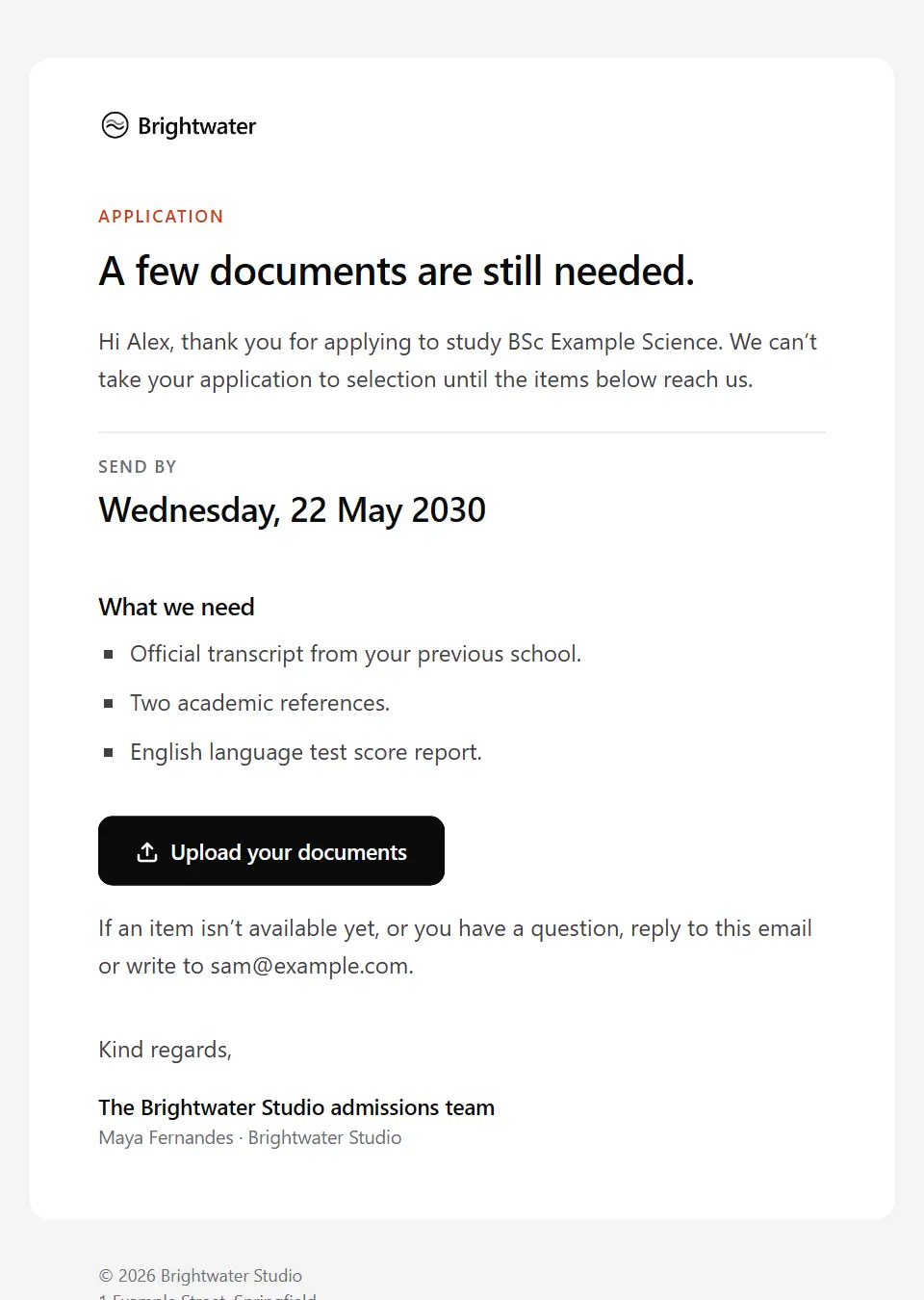
Admission application incomplete
Tells an applicant which documents or details their study application still needs, the date to send them by and where to upload them so the application can go to selection.
Subject: Documents needed for application [application reference]
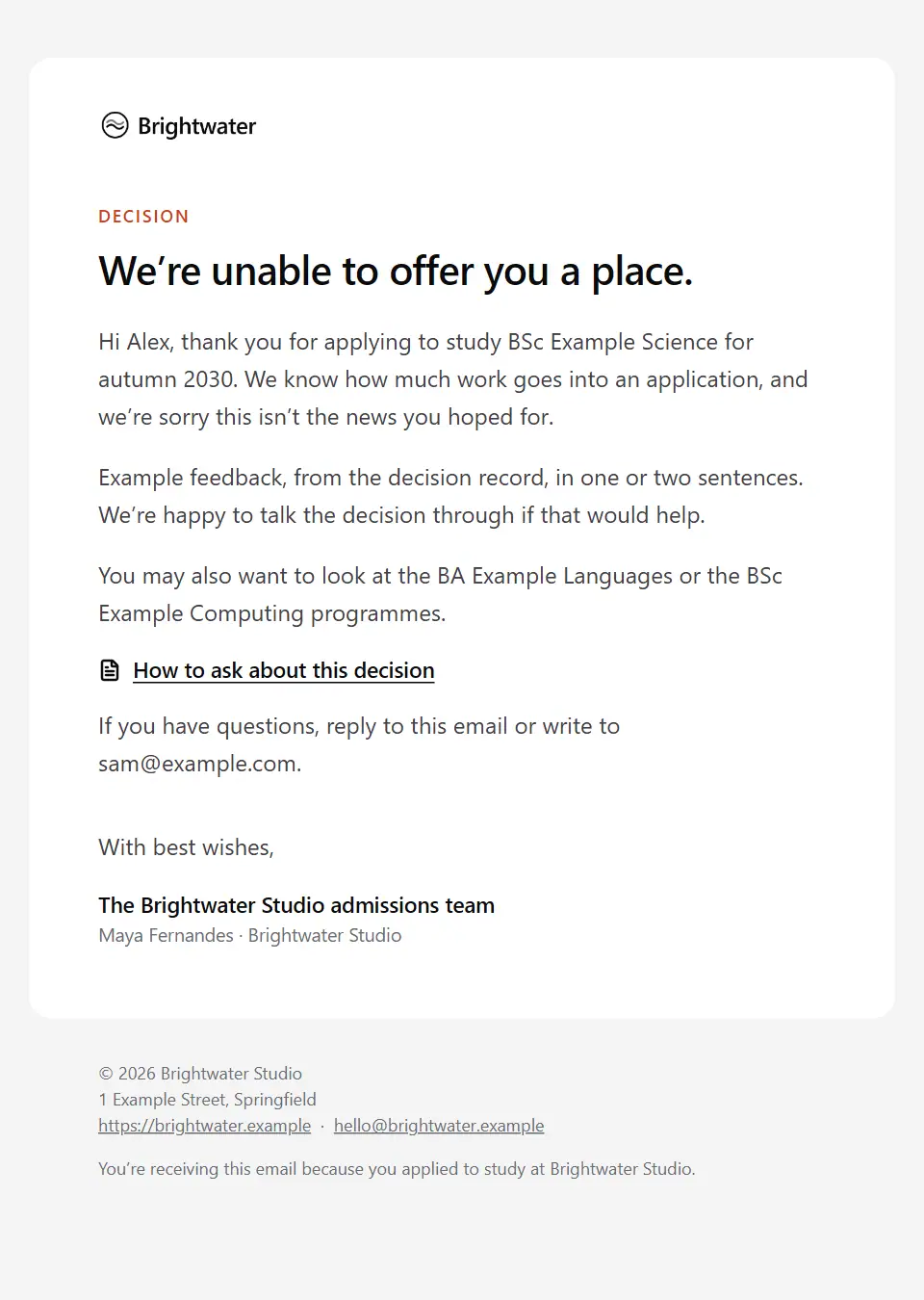
Unsuccessful admission application
Tells an applicant, kindly and plainly, that they have not been offered a place. It includes any feedback the decision record allows, other options and who to ask about the decision.
Subject: An update on your [programme name] application
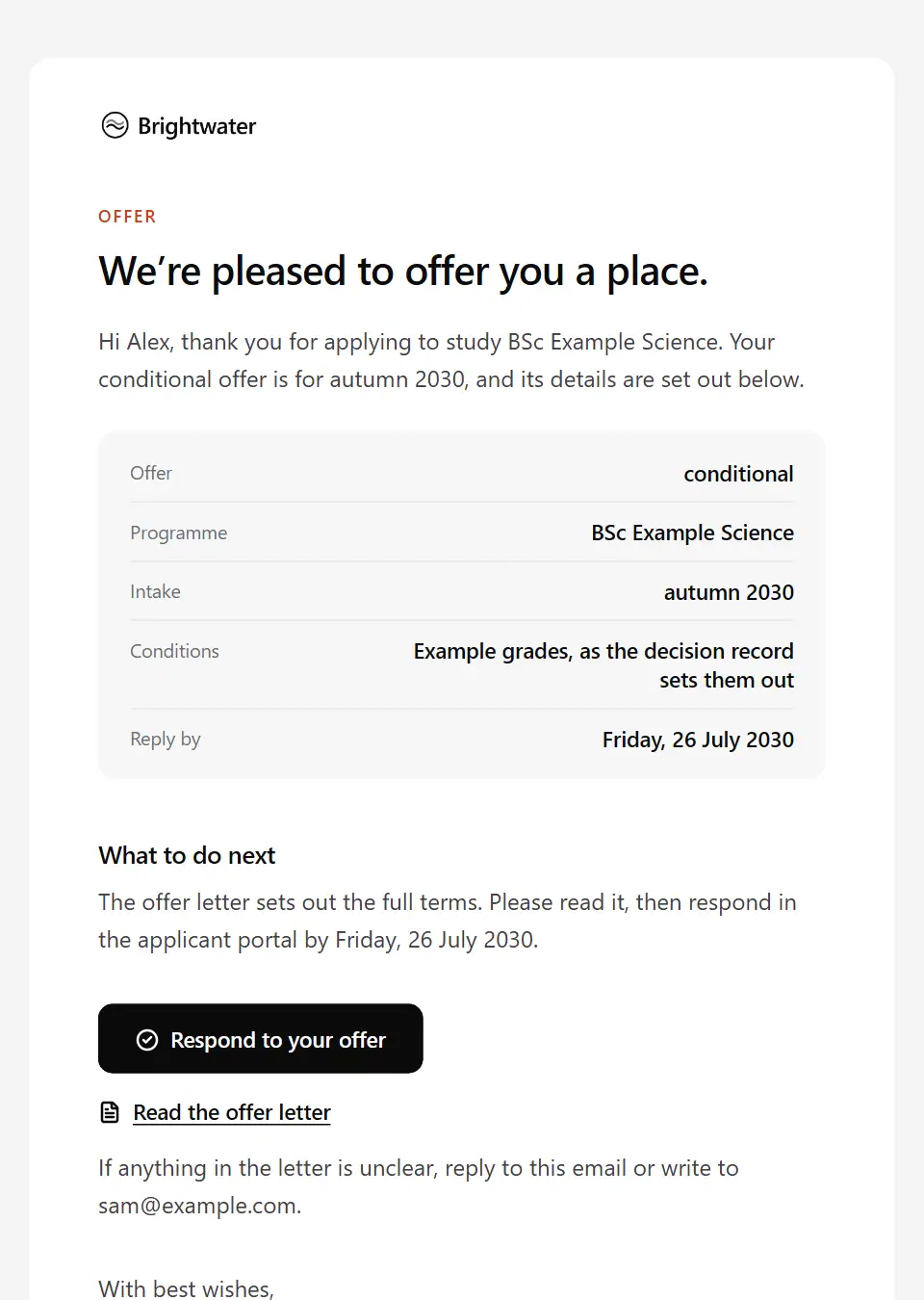
Admission offer
Tells an applicant they have been offered a place. It gives the offer type and any conditions from the decision record, the reply-by date and a link to respond; the offer letter holds the terms.
Subject: Your offer to study [programme name]
Admission place confirmed
Confirms an applicant’s place once they have accepted the offer and met any conditions. It lists what is still to do before enrolment, such as a deposit, documents or accommodation, and when enrolment opens.
Subject: Your place on [programme name] is confirmed
Admission waiting list notice
Tells an applicant they are on the waiting list for a programme. It explains what that means, when places will be confirmed and how to stay on the list or leave it.
Subject: Your place on the [programme name] waiting list
Prospective student enquiry response
Replies to someone who asked about a course or programme with the answer to their question, the entry requirements and intake dates from the course record, how to apply and the next open day.
Subject: Your question about [programme name]
Study application received
Confirms that an application to study has arrived. It gives the applicant a reference, says when to expect a decision and links to the applicant portal where they can follow progress.
Subject: Your application to study [programme name]
School place offer
Tells a parent or guardian their child has been offered a school place. It gives the year group and start date, how to accept or decline by the reply date and what happens next.
Subject: A place for [student name] at [company name]
Course withdrawal confirmation
Confirms a student’s withdrawal from their course or programme at their request. It gives the effective date, what it means for fees, funding and their record, and how to return later.
Subject: Withdrawal confirmed: [programme name]
Interruption of studies confirmation
Confirms a student’s agreed break from their studies. It gives the dates and expected return, what stays open and what pauses, the effect on fees and funding as the record states, and how to arrange the return.
Subject: Your break from studies is confirmed
New student orientation
Gives new students what they need for orientation: the dates and place, the programme of sessions, what to bring and the steps to finish before they arrive.
Subject: Your orientation starts on [orientation start date]
Re-enrolment for returning students
Tells continuing students that re-enrolment for the next academic year is open. It lists the steps to complete in the student portal, the deadline and what the enrolment policy says happens if it is missed.
Subject: Re-enrol for [academic year] by [deadline date]
Student enrolment confirmation
Confirms that a student is enrolled. It gives the programme, student ID, start date and first steps, such as signing in to the student portal, and never includes a password.
Subject: You’re enrolled on [programme name]
Tuition fee overdue notice
Tells a student, plainly and without threats, that tuition fees are past due. It says what the fee policy says happens next, how to pay and who to talk to about a payment arrangement.
Subject: Tuition fees overdue since [due date]
Tuition fee payment received
A receipt for a payment to a student account. It gives the amount, date and reference, the term it was applied to, the remaining balance and where to download a receipt for a sponsor.
Subject: We’ve received [amount paid] for your tuition fees
Tuition fee reminder
A polite reminder before tuition fees or an instalment fall due. It gives the amount, the due date, how to pay through the student account and who to talk to early if paying will be difficult.
Subject: Tuition fees due on [due date]
Class cancellation or change notice
Tells students on a course that a class, lecture or seminar is cancelled, moved or taught differently. It gives the reason in a sentence, how missed teaching will be covered and where to check the timetable.
Subject: Change to [course name] on [class date]
Class timetable published
Tells students their class timetable for a term is ready in the portal. It says when teaching starts, how to report a clash and where room changes will appear.
Subject: Your [term name] timetable is ready
Student attendance concern
A supportive personal note from a tutor to a student whose attendance has fallen below what the course expects. It sets out the attendance record, why it matters and an offer to talk.
Subject: Your attendance this term, [first name]
Student non-engagement formal notice
A formal follow-up when a student has stopped attending and has not answered earlier contact. It says what the engagement policy says happens next, the date to get in touch by and the support still available.
Subject: Contact us about your studies by [response deadline]
Pupil attendance concern for parents
A calm personal note to a parent or guardian whose child’s attendance has fallen below the school’s expectation. It says what the record shows and invites them to meet and agree support.
Subject: About [student name]’s attendance this term
Academic appeal acknowledgement
Confirms that a student’s academic appeal has been received. It gives the reference, who is handling it, the stages it goes through and when the student will next hear, without commenting on its merits.
Subject: Your academic appeal [case reference]
Academic integrity meeting invitation
Invites a student to a meeting about a concern over an assessment, such as suspected plagiarism. It gives the concern, the meeting details, who will attend, who may come with the student and the procedure. It states no finding.
Subject: A meeting about your [assessment name] submission
Coursework extension decision
Tells a student the decision on their request for more time on an assessment, taken from the decision record. It gives the new deadline if granted, or the reason and the other options if not.
Subject: Your extension request for [assessment name]
Exam and assessment schedule
Tells students that their exam and coursework dates for an assessment period are in the portal. It gives the period’s dates, the deadline to request exam arrangements and the exam rules to read.
Subject: Your exam timetable for the [assessment period]
Exam registration confirmation
Confirms which exams a student or learner is entered for. It gives their candidate number, the ID to bring and the date by which to report an error in an entry.
Subject: Your exam entries for the [assessment period]
Results ready in the student portal
Tells a student their results for an assessment period are ready in the student portal, without stating any result, and where to get advice or ask for a review.
Subject: Your results from the [assessment period] are ready
Learner certificate of completion
Tells a learner their certificate of completion is ready. It gives the course and completion date, how to download the certificate, the ID an employer can use to verify it and any renewal date.
Subject: Your [course name] certificate
Academic adviser introduction
A personal note from a student’s newly assigned academic adviser or personal tutor: who they are, what they can help with, how to book time and an invitation to a first meeting.
Subject: I’ll be your academic adviser, [first name]
Learning support plan confirmation
Confirms the study and exam adjustments agreed for a student, such as extra time or accessible materials. It says who will be told about them and how to ask for a change, without naming any condition.
Subject: Your study support plan is in place
Library overdue notice
Tells a library borrower which items are overdue, when they were due, what the library policy says about charges, and how to renew or return them.
Subject: Library items overdue since [due date]
Scholarship application received
Confirms that a scholarship or bursary application has arrived. It gives the reference, when decisions are made and any document still to send.
Subject: Your [scholarship name] application
Scholarship awarded
Tells a student they have been awarded a scholarship or bursary. It gives the value, duration and conditions as the award letter states them, and how to accept the award by the deadline.
Subject: You’ve been awarded the [scholarship name]
Scholarship not awarded
Tells an applicant, warmly and plainly, that their scholarship or bursary application was not successful this round. It points to other funding and who can help.
Subject: The outcome of your [scholarship name] application
Parent–teacher meeting invitation
Invites a parent or guardian to meet their child’s teachers. It gives the date and format, how to book appointment slots by the booking deadline and who to contact.
Subject: Meet [student name]’s teachers on [meeting date]
Unexplained pupil absence
Tells a parent or guardian on the day that their child has not been marked present and no reason has been given, and asks them to reply or call the school straight away.
Subject: Absence: [student name] on [absence date]
School closure notice for parents
Tells parents and guardians the school is closed or partly closed. It gives the dates, the reason, which pupils if any are still expected in, how learning continues at home and when the next update will come.
Subject: [company name] is closed on [closure date]
School progress report available
Tells a parent or guardian their child’s progress report is ready in the parent portal, without including any grades or comments, and who to contact with questions.
Subject: [student name]’s [report period] report is ready
School trip consent request
Asks a parent or guardian to give or decline consent for their child to join a trip or activity. It gives what, when and where, any cost, the reply deadline and where to check medical details.
Subject: Consent needed for [trip name]
Graduate alumni invitation
Invites a recent graduate to join the alumni community. It explains what membership offers, how to join and how to choose the ways the alumni team keeps in touch, and graduates can reply to opt out.
Subject: Stay connected with [company name] after graduation
Graduation ceremony information
Gives an eligible student the details of their graduation ceremony: date, time and venue, how to register and request guest tickets by the deadline, and what eligibility depends on.
Subject: Your graduation ceremony on [ceremony date]
Transcript request confirmation
Confirms a request for an academic transcript or certified copy. It gives the reference, the document type, who receives it, the expected issue date and how to follow progress.
Subject: Your transcript request [reference number]
Send your first approved email today
Connect a mailbox, pick a template and send with the checks and approvals your organization needs. No new email address, no new habits.