68 templates
Marketing
Starter templates for marketing, as they appear in the composer. Subject lines show their variables in brackets.
As recipients see them
How these emails look
Rendered by SecureThread’s own email renderer with each template’s example details. Your logo, company details and the facts you fill in replace them when you send.
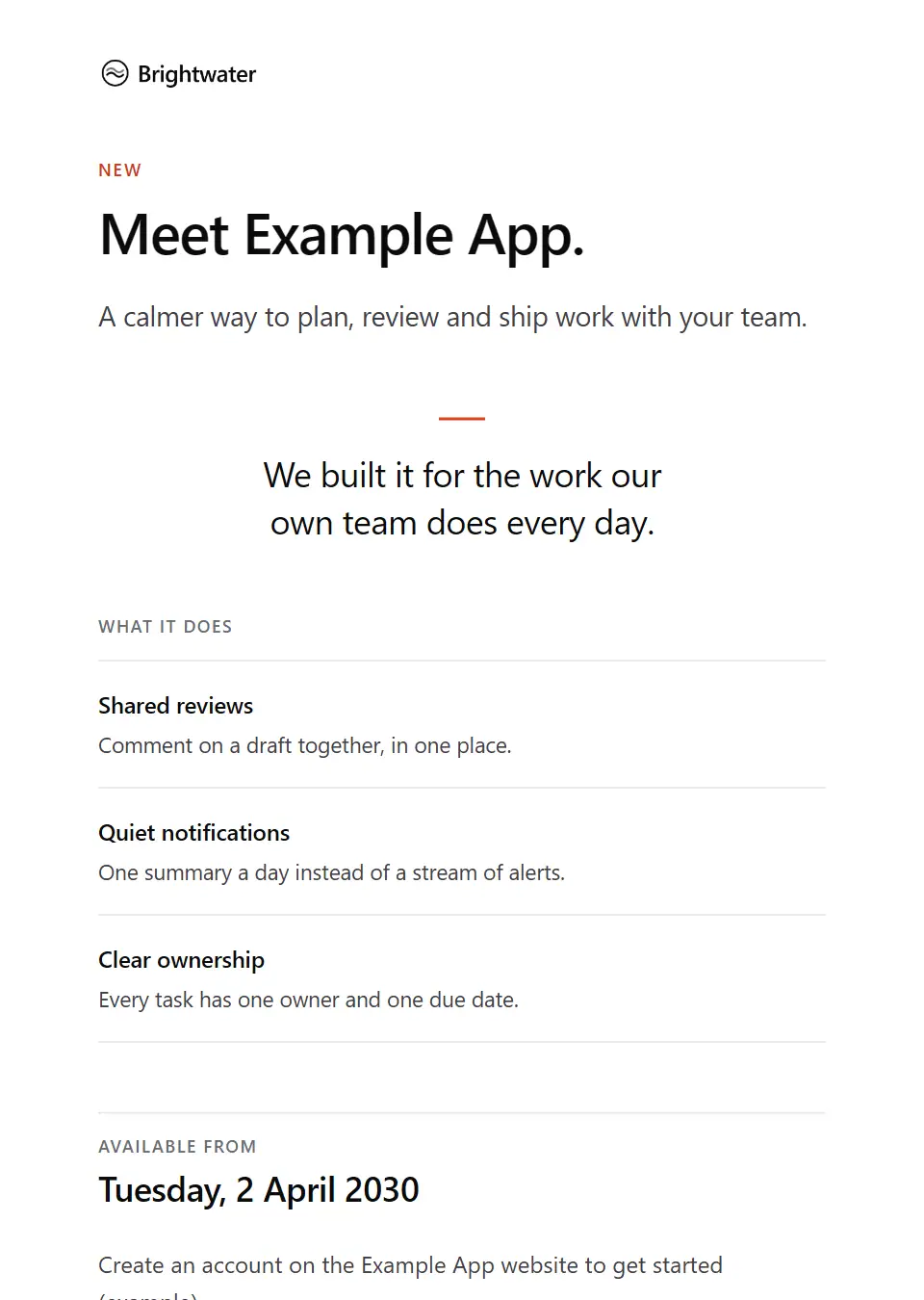
Product launch announcement
Introduces a new product to people who asked to hear from you: what it is, three things it does and when it is available.
Subject: Introducing [product name]
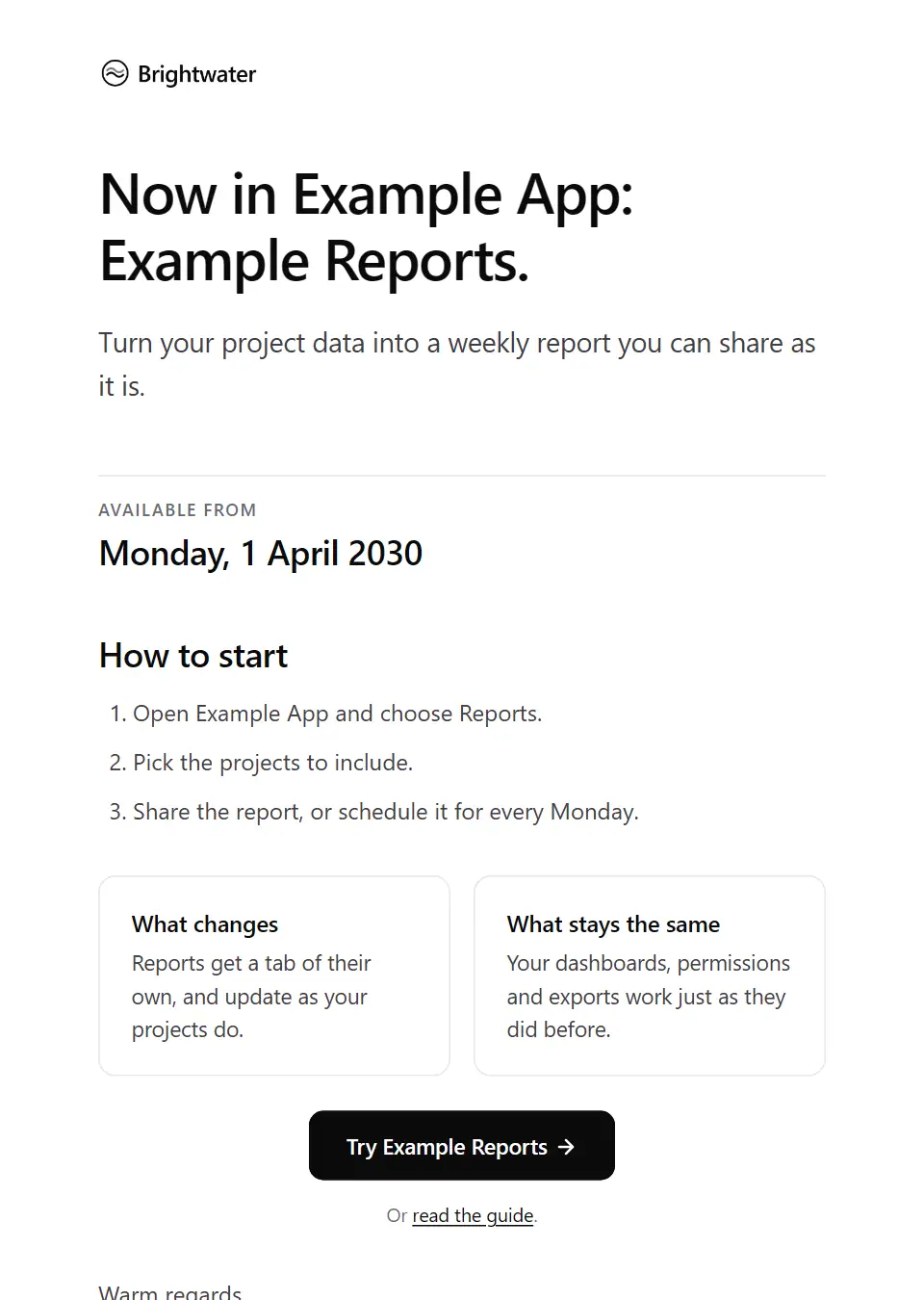
Feature update
Tells existing customers about one new feature: what it does, how to start, and what stays the same.
Subject: New in [product name]: [feature name]
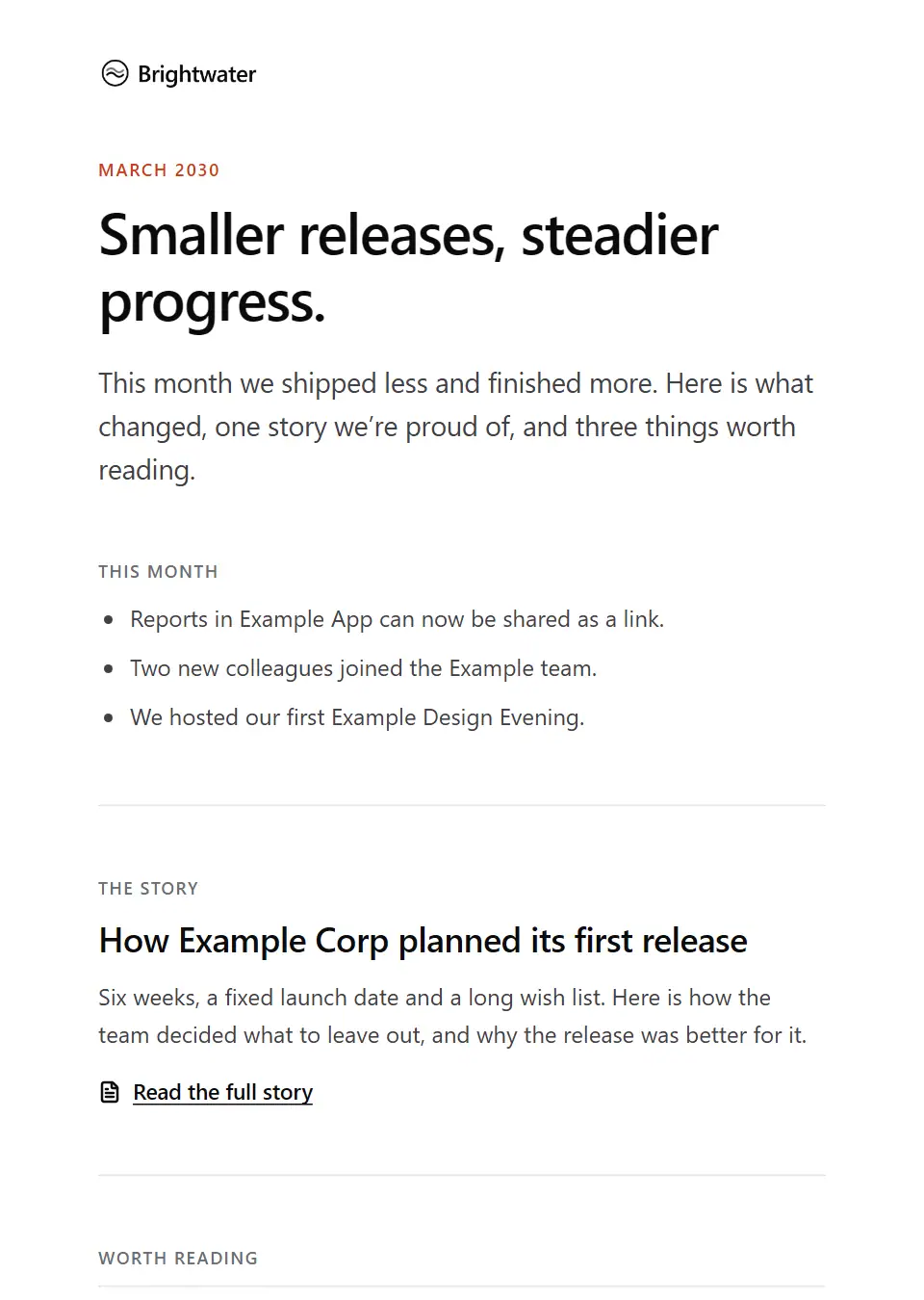
Monthly newsletter
A monthly letter to subscribers: highlights, one short story and three links worth reading, all written by you.
Subject: [newsletter edition]: [newsletter headline]
Case study
Shares a client story with subscribers: the challenge, the work, agreed results and the client’s own words.
Subject: Case study: [case study title]
Article recommendation
A short personal note that shares one of your published articles with a contact: the idea in a sentence, and no request for a meeting.
Subject: Worth a read: [article title]
Testimonial request
A personal note asking a client for a few words about your work together, with no pressure and their approval first.
Subject: A small favour: a few words about [project name]
Customer feedback survey
Invites a customer to a short survey, with the time it takes, when it closes and how answers are used.
Subject: How is [product name] working for you?
Press pitch
A short, personal story pitch to a journalist: the idea, why it matters now and what you can offer.
Subject: Story idea: [story hook]
Seasonal greeting
A warm, brief greeting and thank-you for clients and contacts, worded to suit any occasion or none.
Subject: Warm wishes from everyone at [company name]
New service announcement
Introduces a new service to existing clients: who it is for, how it works in three stages and how to talk about it.
Subject: Introducing [service name] from [company name]
Press release distribution
Sends a news release to the media list: the headline, the embargo, key facts, a quotation and who to call for interviews.
Subject: News release: [release headline]
Partnership announcement
Announces a new partnership to people who asked to hear from you: what it is, what changes for them and from when.
Subject: Our new partnership with [partner name]
Product update digest
A periodic round-up for customers: three new features, the improvements and the fixes, with a link to the full release notes.
Subject: [product name] updates for [update period]
Webinar recap
Sends everyone who registered for a webinar the key takeaways, answers to questions left open, the recording and the slides.
Subject: Recap and recording: [event name]
Customer spotlight invitation
Invites a customer to be featured in a spotlight: what you’d like to tell, the format, the time it takes and their approval first.
Subject: An invitation to feature [recipient company]
Referral programme invitation
Invites clients to a referral programme: how it works in three steps, what each side receives and where the terms are.
Subject: Introduce someone to [company name]
Award nomination submitted
Tells a client you’ve entered your work together for an award: which award, what the entry includes and when results are announced.
Subject: We’ve entered [project name] for an award
Newsletter welcome
Welcomes a subscriber once they’ve confirmed: what they’ll receive and how often, a few good places to start, and how to change how often they hear from you. Send it as a campaign.
Subject: Welcome to [newsletter name]
Brand refresh announcement
Tells customers and contacts your brand is changing: what looks different and from when, what stays exactly the same, and how to recognise genuine emails from you.
Subject: A new logo and colours from [effective date]
Feature retirement notice
Gives customers notice that a feature is being retired: the date, the reason, what replaces it, what to do before then (such as exporting data) and who can help with the move.
Subject: [feature name] is retiring on [retirement date]
New location opening announcement
Tells local customers who asked to hear from you that a new location is opening: the address, opening date and hours, and what to expect in the first days. Send it as a campaign.
Subject: We’re opening in [location area] on [opening date]
Version release notes
Tells customer administrators what one versioned release contains: the highlights, what behaves differently, anything they must do and by when, known issues and the full changelog.
Subject: [product name] [release version]: release notes
Customer education series lesson
One lesson in an email series that teaches customers to get more from a product: one idea, one step to try now, and what the next lesson covers. Send it as a campaign.
Subject: [series name]: [lesson title]
Gated content download
Sends the guide, report or toolkit someone asked for through a form: the download link, what’s inside, how long the link works and who to ask about it.
Subject: Your copy of [resource title]
Gated content follow-up
A short personal note a few days after someone downloads a resource: the part most relevant to them, one related piece, and an easy offer to talk or to say no.
Subject: A thought on [resource title]
Campaign correction notice
Corrects a campaign already sent with a wrong date, link or price: what was wrong, the right detail and a brief apology, to the same recipients. Send it as a campaign.
Subject: Correction: [corrected item] in our earlier email
Campaign launch brief
Briefs colleagues before a campaign goes out: what launches when, who it targets, the key message, the questions sales and support should expect, and where the FAQs live.
Subject: Campaign brief: [campaign name]
Campaign performance report
Reports a campaign’s results to colleagues and leadership: the goal, the figures against it, what worked, what didn’t, the lessons and the decision needed, with the dashboard linked.
Subject: [campaign name] results: [reporting period]
Competition winner notification
Tells the winner of a prize draw or competition what they’ve won, how and by when to claim it, and where the published terms are.
Subject: [competition name]: you’ve won [prize summary]
Influencer collaboration proposal
A short personal note inviting a creator to collaborate: the idea, what you’d ask them to make, how it will be labelled as paid or gifted, the usage rights and the fee or gift.
Subject: A collaboration idea for [campaign name]
Promotional offer announcement
Announces a sale or special offer to subscribers: what it covers, who qualifies, the dates, how to redeem it and where to read the terms. Send it as a campaign.
Subject: [offer name] ends [end date]
Local marketing kit for franchisees
Gives franchisees the kit for a network campaign: the campaign dates, what the kit contains, how far it may be adapted locally within brand rules and how to get local materials approved.
Subject: Your local marketing kit for [campaign name]
Abandoned basket reminder
Reminds a subscriber who left items in their basket what they chose, with a link straight back to it and a way to ask about sizing or delivery, without pressure or invented urgency. Send it as a campaign.
Subject: The items in your [company name] basket
Back in stock alert
Tells subscribers who asked about an item that it’s available again: the item, the options now in stock, the price and a link to it, with no claims about how long stock will last. Send it as a campaign.
Subject: [product name] is back in stock
Lapsed customer win-back campaign
Reconnects with subscribers who haven’t bought or visited in a while: what’s new, a current offer with its terms and end date, and a simple reply to say what they’d like to hear about. Send it as a campaign.
Subject: What’s new at [company name] since your last visit
Wishlist price drop alert
Tells a subscriber that an item on their wishlist now costs less: the previous and current price, how long the lower price applies, and a link to the item. Send it as a campaign.
Subject: A lower price on [product name]
Customer advisory board invitation
Invites a customer to join an advisory board: what members do, how often it meets and for how long, any confidentiality terms, what members receive and when to reply.
Subject: An invitation to join the [board name]
Survey closing reminder
One reminder to customers who haven’t answered a survey yet: when it closes, how long it takes and how answers are used, with thanks to anyone who has already replied.
Subject: [survey name] closes on [survey close date]
Customer survey results summary
Closes the loop with customers who took part in a survey: how many replied, the main themes, what you’ll change, what you won’t and why, and where to read the full summary.
Subject: What we heard in [survey name]
Public consultation notice
Asks the public for views on a proposal before a decision is made: what is proposed, who it affects, the closing date, the ways to respond, accessible formats and how responses will be used.
Subject: Have your say: [consultation name]
Public consultation outcome
Reports back to people who responded to a consultation: the number of responses, the main themes, what changed, what didn’t and why, and the decision’s status and date.
Subject: Consultation outcome: [consultation name]
Loyalty points statement
A statement for loyalty members, periodic or after a purchase: the points balance, what was earned and redeemed, any points due to expire and when, and their current tier.
Subject: Your [loyalty programme name] statement for [statement period]
Loyalty tier downgrade
Tells a member plainly that their loyalty tier will change: the new tier and the date, which benefits change and which stay, and what would regain the previous tier.
Subject: Your [loyalty programme name] tier is changing
Loyalty tier upgrade
Congratulates a member on reaching a higher loyalty tier: the new tier, the benefits it adds as the programme defines them, how long it lasts and what keeps it.
Subject: You’ve reached [new tier] in [loyalty programme name]
Referral not eligible
Explains plainly that a referral didn’t qualify for a reward: which referral, the programme condition it didn’t meet, and how to ask for it to be checked again.
Subject: An update on your referral [referral reference]
Referral reward earned
Confirms that a customer’s referral qualified: the reward, when and how it’s applied, and the programme terms, naming the person referred only if they agreed.
Subject: Your referral reward is confirmed
Double opt-in subscription confirmation
Asks someone who signed up to confirm their subscription with one button: what they signed up for, where and when, and that nothing happens if they ignore it.
Subject: Please confirm your subscription to [list name]
Email preferences updated
Confirms a change someone made to their email preferences: what they now receive and how often, what they’ve stopped, and what to do if they didn’t make the change.
Subject: Your email preferences are updated
Inactive subscriber check-in
Asks subscribers you haven’t heard from in a while whether they still want your emails: one button to stay, a way to get fewer, and when you’ll stop if they don’t answer. Send it as a campaign.
Subject: Do you still want to hear from [company name]?
Inactive subscriber removal notice
The last email to subscribers who didn’t answer the check-in: the date they’ll be removed, that nothing else about their account changes, and one button to stay. Send it as a campaign.
Subject: We’ll stop emailing you on [sunset date]
Unsubscribe confirmation
A one-off confirmation that someone has left a mailing list: which list, from when, what they’ll still receive about their account, and how to rejoin if it was a mistake.
Subject: You’re unsubscribed from [list name]
Embargo change notice
Tells journalists who already hold embargoed news that the embargo time has changed or lifted early: the release, the new time, the reason and whether any materials changed.
Subject: Embargo update: [release headline]
Embargoed media briefing invitation
Invites journalists on the media list to a briefing before an announcement, under embargo: when and how it runs, who will speak, the embargo terms and how to register.
Subject: Embargoed briefing: [briefing topic]
Media interview confirmation
Confirms an interview a journalist has arranged with your spokesperson: when and how it happens, who will speak, the agreed topics and ground rules, and who to call on the day.
Subject: Your interview with [spokesperson name] on [interview date]
Article pitch to an editor
A short note from a writer offering an editor an article: the working headline, the angle, why now, an outline, the length and links to published work.
Subject: Pitch: [working headline]
Case study draft approval request
Sends a customer the draft of a case study about them to approve before publication: where it will appear, the facts, quotes and logo use to check, and the date you need their answer.
Subject: Your case study draft: [case study title]
Community invitation
Invites customers to join your online community or user group: who’s in it, what happens there, the guidelines and how to join. Send it as a campaign.
Subject: Join the [community name] community
Research report launch
Shares new research with subscribers: why you ran it, how it was done, the main findings exactly as the report states them, and where to download it. Send it as a campaign.
Subject: New research: [report title]
User-generated content permission request
Asks someone personally for permission to reuse a photo, video or post they shared about you: what, where and for how long, how they’ll be credited, and that no is a fine answer.
Subject: May we share your [content type]?
Commission cancellation and kill fee
Tells a contributor that a commissioned piece won’t run: why, the kill fee their agreement sets, how to invoice it and where the rights in their work now stand.
Subject: Your piece won’t run: [working headline]
Contributor onboarding welcome
Welcomes a new writer or creator to a publication: their editor, the contributor agreement to sign, the style guide, how to file work and how payment is set up through the official portal.
Subject: Welcome as a contributor to [publication name]
Contributor revision request
Returns a contributor’s draft with the editor’s notes: the changes needed, the sources to supply for fact-checking, the target length and the date for the revised draft.
Subject: Edits for [working headline]
Editorial commissioning brief
Commissions a piece from a writer, photographer or illustrator: the angle, what it must cover, the length or specification, the filing deadline, the agreed fee and how to file.
Subject: Your commission: [working headline]
Editorial pitch acknowledgement
Confirms that a publication has a writer’s pitch or submission, gives a reference and says when to expect an answer, with a way to ask if none comes by then.
Subject: We have your pitch: [working headline]
Editorial submission accepted
Tells a writer or creator their pitch or submission is accepted: the section and planned issue, who their editor is, and the agreement to sign before work goes further.
Subject: Accepted: [working headline]
Editorial submission declined
Declines a writer’s pitch or submission plainly, with an optional line of feedback, what the section is looking for and the terms on which it may be offered elsewhere.
Subject: About your pitch: [working headline]
Pre-publication fact-check request
Asks a source or interviewee to confirm the facts and quotations attributed to them before publication, by a deadline, making clear it is a check of facts rather than approval of the story.
Subject: Checking facts for our story on [story topic]
Right of reply request
Gives a person or organisation named in a forthcoming story the chance to respond to specific points before publication, with the deadline and how their response will be used.
Subject: Request for comment: [story topic]
Send your first approved email today
Connect a mailbox, pick a template and send with the checks and approvals your organization needs. No new email address, no new habits.